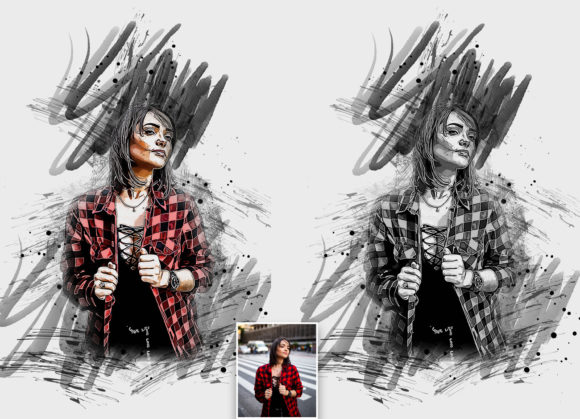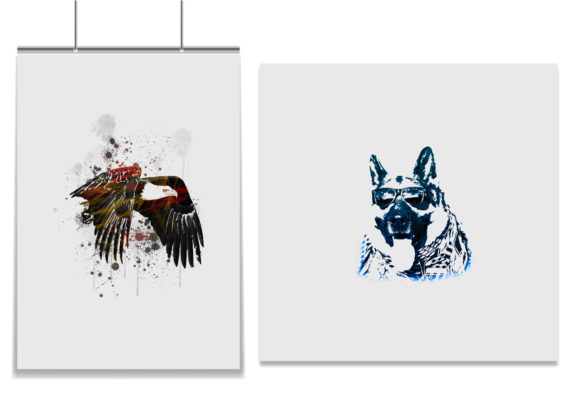
Transforming Photos into Art with a Vector Tracing Photoshop Action
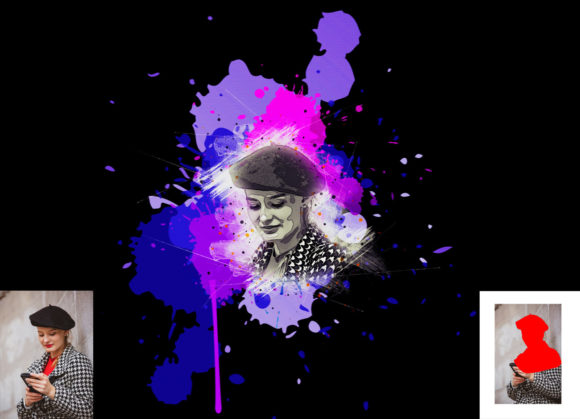
In the fast-paced world of digital design, the ability to quickly convert raster images into clean, scalable vector-style graphics is a superpower. Whether you are a graphic designer looking to speed up your workflow, a photographer wanting to add a stylized edge to your portfolio, or a small business owner creating unique marketing materials, the Vector Tracing Photoshop Action offers a streamlined solution. This tool is designed to transform your ordinary photos into extraordinary images with a professional vector tracing look, saving you hours of manual pen-tool work.
Why Designers Are Turning to Automated Vector Effects
Traditionally, creating a vector trace from a photograph required meticulous manual labor. Designers would spend hours plotting anchor points and adjusting bezier curves to mimic the shapes in an image. While this method yields high precision, it is often impractical for tight deadlines or high-volume projects. The Vector Tracing Photoshop Action bridges the gap between artistic intent and efficiency. By automating the complex process of shape recognition and color separation, this action allows creators to achieve a polished, illustrative aesthetic in minutes rather than days.
The appeal lies not just in speed, but in consistency. When working on a series of images for a brand campaign or a social media feed, maintaining a uniform style is crucial. Using a dedicated action ensures that every photo undergoes the same transformation process, resulting in a cohesive visual identity. This non-destructive effect means you can tweak and refine the output without permanently altering your original file, giving you the flexibility to experiment until the look is perfect.
Real-World Applications Across Industries
The versatility of this tool makes it valuable across various sectors. Here is how different professionals can leverage the Vector Tracing Photoshop Action in their daily workflows:
- Marketing and Advertising: Agencies often need eye-catching visuals for posters, flyers, and digital ads. A vector-style portrait or product shot stands out in a sea of standard photography. With ten different color options included in the pack, marketers can easily match the output to specific brand guidelines without needing advanced color grading skills.
- Fashion and Apparel Design: Creating graphics for t-shirts, hoodies, and tote bags requires designs that scale well and print cleanly. Vector-style images are ideal for screen printing because they simplify complex details into bold shapes and colors. Designers can take a model’s photo, apply the action, and instantly have a print-ready graphic that retains the essence of the original image while adopting a trendy, illustrative vibe.
- Social Media Content Creation: Influencers and content creators thrive on uniqueness. Applying a vector trace effect to profile pictures or post backgrounds can create a signature look that followers recognize immediately. The ease of customization allows creators to refresh their aesthetic seasonally by simply swapping out color palettes.
- Web and UI Design: Website headers and hero images benefit from lightweight, sharp graphics. While the output is technically raster-based within Photoshop, the visual style mimics vectors, providing a modern, flat-design appearance that loads quickly and looks crisp on high-resolution screens.
Getting the Best Results: Practical Considerations
While the Vector Tracing Photoshop Action is powerful, understanding how to prepare your files will significantly enhance the final output. The quality of the result is heavily dependent on the input image and the preparation steps taken before running the action. It is not a magic button that fixes poor lighting or low resolution; rather, it is a tool that amplifies good source material.
One of the most critical steps is canvas preparation. For optimal results, you should extract your subject from the background. A clean separation ensures that the action focuses on the main subject rather than trying to interpret noisy or cluttered backgrounds. Simply select your background, use the crop tool to extend the canvas slightly on two sides or all sides, and resize your image to approximately 3000x3000 pixels at 72 DPI. This resolution provides enough detail for the action to detect edges and shapes accurately without overwhelming the software with unnecessary data.
Another key technique involves the "paint" layer. Before triggering the action, open your photo and create a new layer named “paint” in lowercase. Using a brush, manually paint over the areas of the image you want to emphasize or define. This step acts as a guide for the action, helping it understand which parts of the image are most important. Once you have painted the desired areas, close the eye icon on the paint layer to hide it, keep the layer selected, and then click the play button on the action panel. This simple interaction allows for a level of control that fully automated tools often lack, ensuring the final vector look aligns with your creative vision.
Customization and Compatibility
Flexibility is a hallmark of this professional pack. The inclusion of ten different color options means you are not stuck with a single preset. You can change colors very easily, allowing for rapid experimentation. Whether you prefer a monochromatic scheme, a vibrant pop-art style, or a muted vintage tone, the action supports diverse artistic directions. The organized layers generated by the action make further customization straightforward. You can adjust individual elements, tweak opacity, or blend modes to fine-tune the appearance.
Compatibility is another strong point. The action has been tested and works seamlessly on Photoshop English versions, specifically CC2020. However, it also supports a wide range of earlier versions, including CS5.5, CS6, CC2014, CC2015, CC2015.5, CC2016, CC2017, CC2018, and CC2019. This broad support ensures that users with older hardware or software licenses can still access professional-grade tools. The package includes everything needed to get started: Photoshop ATN files, custom brushes, a help file, a PDF guide, and a user-friendly installation process.
Limitations and Best Practices
It is important to recognize that while the Vector Tracing Photoshop Action produces high-quality results, it is best suited for images with clear subjects and distinct contrasts. Highly detailed photographs with subtle gradients may lose some nuance in the translation to a vector style. Therefore, selecting the right source images is crucial. Portraits with strong lighting, product shots with clean lines, and landscapes with defined shapes tend to yield the most striking results.
Additionally, because the effect is non-destructive, you are encouraged to iterate. Do not settle for the first output if it does not meet your expectations. Adjust your brush strokes on the "paint" layer, try different color presets, or modify the canvas size. The learning curve is minimal, but the mastery comes from understanding how your input influences the output. By treating the action as a collaborative partner rather than a standalone solution, you can unlock its full potential and create truly unique visual assets.
Ultimately, this tool empowers creators to push boundaries without getting bogged down in technical complexities. It democratizes a style that was once reserved for expert illustrators, making it accessible to photographers, marketers, and hobbyists alike. With easy installation, comprehensive guides, and robust compatibility, the Vector Tracing Photoshop Action is a valuable addition to any digital artist's toolkit.