Transform Photos With Real Sketch Art Action
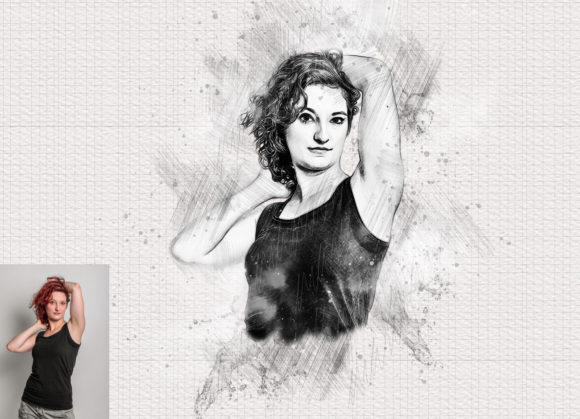
In the fast-paced world of digital design, the ability to bridge the gap between photography and traditional illustration is a highly sought-after skill. Clients, audiences, and personal projects often demand a unique aesthetic that feels handcrafted yet maintains the precision of digital media. This is where the Real Sketch Art Photoshop Action becomes an indispensable tool for creators. It is not merely a filter; it is a sophisticated workflow designed to transform ordinary photographs into extraordinary, hand-drawn sketches with remarkable fidelity.
For designers, marketers, and hobbyists alike, the challenge has always been time. Creating a realistic sketch from scratch requires hours of meticulous brushwork, layering, and texturing. This action eliminates that bottleneck, offering a non-destructive, professional-grade solution that respects the integrity of your original image while applying a complex artistic overlay. Whether you are preparing social media content, designing book covers, or creating unique portraits, this tool allows you to achieve a polished, artistic look in minutes rather than days.
The Mechanics of Digital Artistry
Understanding what makes this action effective requires looking beyond the surface. Many basic filters simply apply a static overlay, resulting in flat, unnatural images that lack depth. The Real Sketch Art Photoshop Action, however, operates on a more intelligent level. It utilizes a combination of custom brushes, patterns, and adjustment layers to mimic the organic variability of pencil on paper.
The core strength of this tool lies in its non-destructive nature. When you apply the action, it does not permanently alter your original pixel data. Instead, it generates a structured group of layers that can be tweaked, masked, or adjusted at any time. This flexibility is crucial for professional workflows where client feedback may require subtle changes to contrast, brightness, or specific details. You retain full control over the final output, ensuring that the artistic effect enhances rather than obscures the subject.
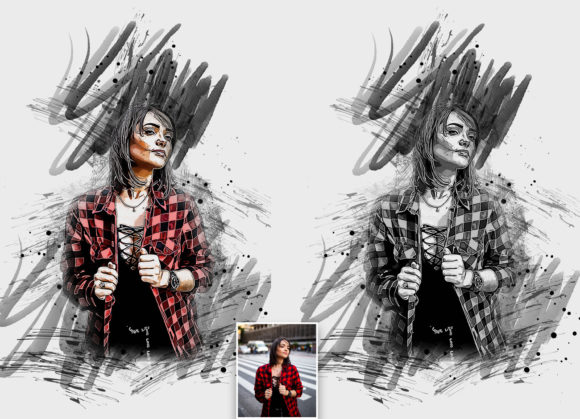
Furthermore, the action includes 10 different color options, accessible via an "unviewed eye" layer mechanism. This feature allows for rapid experimentation with tonal moods. You can switch from a classic graphite gray to a sepia tone, a cool blue tint, or a warm earthy palette with a single click. This versatility means one photo can yield ten distinct artistic interpretations, providing ample material for A/B testing in marketing campaigns or exploring different stylistic directions in personal art projects.
Practical Applications for Modern Creators
The utility of the Real Sketch Art Photoshop Action extends far beyond simple portrait editing. Its adaptability makes it relevant for a wide range of industries and creative disciplines. Here is how different users can leverage this tool to elevate their work:
- Marketing and Branding: In a feed saturated with high-gloss photography, a sketch-style image stops the scroll. Brands can use this action to create unique hero images for websites, email headers, or social media posts that convey sophistication and creativity. It is particularly effective for lifestyle brands aiming for a rustic, artisanal, or vintage aesthetic.
- Educational Content: Educators and instructional designers can transform complex diagrams or historical photos into sketch formats. This reduces visual noise and helps students focus on key structural elements, making learning materials more engaging and less intimidating.
- Wedding and Event Photography: Photographers can offer premium add-on services by providing clients with artistic sketch versions of their favorite shots. These make for stunning wall art, save-the-date cards, or guest book inserts, adding significant value to photography packages.
- Interior Design and Architecture: Architects and interior designers can convert realistic renderings into sketch-style visuals. This approach is often used in early client presentations to convey concept and mood without getting bogged down in photorealistic details that might change later.
Achieving Professional Results: A Step-by-Step Approach
While the action is designed for ease of use, achieving the best possible result requires attention to preparation. The difference between a good outcome and a great one often lies in the setup. The developers of this action have provided specific instructions to ensure consistency, and following them is key to unlocking its full potential.
First, canvas preparation is critical. For optimal resolution and detail, you should expand your canvas area. Start by selecting your background image and using the crop tool to expand two sides or all sides. Resize your image to 3000x3000 pixels with a DPI of 72. This larger workspace gives the action enough room to generate detailed brush strokes without pixelation or blurring.
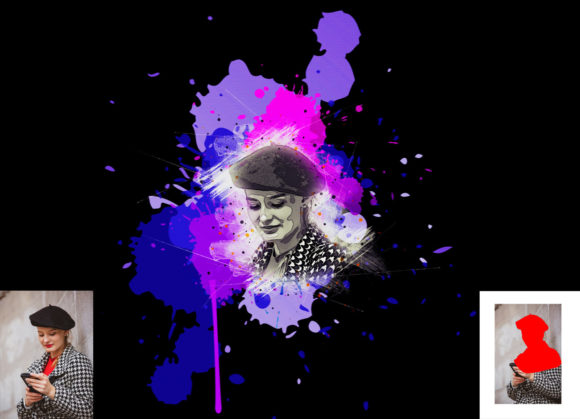
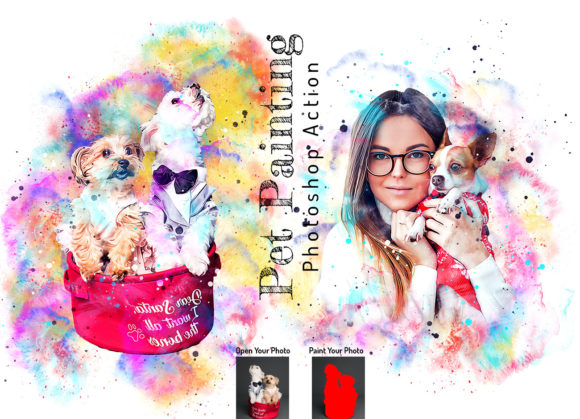
Next, the painting phase is where you guide the AI-like logic of the action. Open your photo and create a new layer, renaming it exactly as "paint" in lowercase. This naming convention is essential for the action to recognize the layer. Using a standard brush, paint over the areas of the image you want to emphasize or transform. You do not need to be a master painter here; broad strokes indicating light and shadow are often sufficient. Once you have painted, close the eye icon for the "paint" layer to hide it, but keep the layer selected. Then, simply click the play button on the action panel.
This process ensures that the sketch effect is applied with context, respecting the light and form you have indicated. It transforms a generic filter application into a guided artistic process, resulting in images that feel intentional and curated.
Compatibility and Technical Requirements
One of the significant advantages of this pack is its broad compatibility. It has been rigorously tested and confirmed to work on Photoshop English versions, ranging from CS5.5 up to the latest CC2020 release. This wide support ensures that freelancers and agencies working with older hardware or specific legacy workflows can still utilize this modern tool.
The package includes everything needed for a seamless experience:
- Photoshop ATN Files: The core action file that drives the transformation.
- Brushes and Patterns: Custom assets that define the texture and stroke quality of the sketch.
- Color Options: Ten pre-configured color variations for instant stylistic changes.
- Documentation: A comprehensive PDF help file and user guide that walks you through installation and troubleshooting.
It is important to note that the software must be set to English for the action to function correctly, as it relies on specific layer names and menu commands. For users with non-English versions, switching the interface language temporarily is a small step that yields significant rewards.
Customization and Creative Freedom
The true power of the Real Sketch Art Photoshop Action lies in its customizability. Because the effect is organized into clean, labeled layers, you are not stuck with the default output. You can adjust the opacity of individual brush layers, tweak the levels and curves adjustment layers, or mask out specific areas where the sketch effect might be too heavy.
For instance, if you want a hybrid look where the subject’s eyes remain in full color while the rest of the face is sketched, you can simply use a layer mask to reveal the original photo beneath. This level of control allows for high-end retouching and composite work, enabling you to create surreal, mixed-media artworks that stand out in portfolios and galleries.
Ultimately, this tool is about empowering creativity. It removes the technical barriers to entry for sketch-style art, allowing you to focus on composition, storytelling, and vision. Whether you are a seasoned designer looking to speed up your workflow or a beginner eager to explore digital art, this action provides a reliable, professional foundation for your creative endeavors. By integrating this tool into your arsenal, you open up new avenues for expression, efficiency, and artistic innovation.