Evaluating Machine Embroidery Photoshop Actions for Digital Design
In the evolving landscape of digital graphic design, texture and tactile realism play pivotal roles in capturing audience attention. One specific niche that has gained traction among designers is the simulation of physical crafts through digital tools. Machine Embroidery Photoshop Actions represent a specialized set of automated scripts designed to transform flat digital images into visuals that mimic the intricate look of stitched fabric. For designers, marketers, and hobbyists, understanding the utility, limitations, and practical applications of these tools is essential before integrating them into a workflow.
Understanding the Technology and Workflow
At its core, this toolset is not a standalone software but a collection of actions, brushes, and styles compatible with Adobe Photoshop. The primary function is to automate the complex process of creating embroidery effects. Without such actions, a designer would need to manually map stitch paths, adjust lighting for thread sheen, and create displacement maps for fabric texture—a process that can take hours per image. These actions streamline that workflow, allowing users to apply realistic embroidery effects with a few clicks.
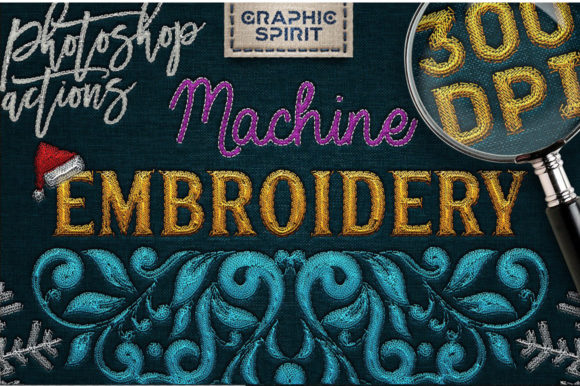
The technical output is versatile. The actions are configured to generate high-resolution files at 300 DPI (dots per inch), which is the industry standard for professional printing. This makes the resulting images suitable for physical products such as posters, greeting cards, and packaging. Conversely, the files can be easily downsampled to 72 DPI for on-screen use, including web design, social media graphics, and digital advertisements. This dual capability ensures that the asset remains useful across both print and digital marketing channels.
Key Features and Components
When evaluating any design asset, it is crucial to examine what is included in the package. A comprehensive set of Machine Embroidery Photoshop Actions typically includes several distinct components that work together to create depth and realism.
- Stitch and Hole Brushes: High-quality brushes are fundamental for manual touch-ups. A robust set usually includes five stitch brushes and five hole brushes, allowing for precise control over the density and type of stitching.
- Emboss Styles: To achieve a three-dimensional look, emboss styles are applied to holes, stitches, and the embroidery itself. Seven distinct styles allow for variation in depth and lighting effects.
- Fabric Backgrounds: Realism depends heavily on the underlying surface. Included backgrounds often feature denim, jeans, light and dark leather (with custom color options), and medium linen. These textures provide the necessary context for the embroidery to appear authentic.
- Outline Stitch Actions: Variety in stitch pattern is critical for avoiding a repetitive look. A typical package offers eight outline actions, ranging from simple regular and short stitches to bold and italic variations, available in both standard and large sizes.
- Filled Style Options: For larger areas, line embroidery actions (usually 1-8 lines) help fill shapes without losing the threaded aesthetic.
- Documentation: A user guide is essential for navigating the installation and application process, ensuring that users can maximize the tool's potential.
Benefits of Using Digital Embroidery Effects
The primary advantage of using these actions is efficiency. Creating realistic textile effects manually requires advanced knowledge of lighting, shadow, and texture mapping. By automating these steps, designers can produce professional-grade results in a fraction of the time. This speed is particularly beneficial for agencies or freelancers working under tight deadlines.
Furthermore, the cost-effectiveness cannot be overstated. Physical machine embroidery requires specialized equipment, threads, fabrics, and significant labor time. Digital simulation eliminates material waste and production costs, allowing for unlimited iterations and design experiments without financial risk. This makes it an ideal solution for prototyping designs before committing to physical production.
Another significant benefit is the flexibility of editing. Unlike physical embroidery, digital stitches can be resized, recolored, or repositioned instantly. If a client requests a change in thread color or fabric background, the designer can implement these changes non-destructively, preserving the original file integrity.
Tradeoffs and Considerations
While the benefits are clear, there are tradeoffs to consider. The most notable limitation is the dependency on Adobe Photoshop. Users must have a subscription to Photoshop and a basic understanding of how to load and run actions. For those unfamiliar with layer masks, blending modes, or resolution settings, there may be a learning curve despite the inclusion of a user guide.
Additionally, while the results are highly realistic, they are still simulations. Close inspection may reveal patterns that differ from actual thread behavior, particularly in complex curves or overlapping colors. Designers aiming for hyper-realism may need to spend additional time manually refining the output using the included brushes to break up repetitive patterns.
It is also important to note the file size implications. High-resolution textures and multiple layers can result in large file sizes. Users with limited storage or slower hardware may experience performance lag when working with complex compositions.
Ideal Use Cases
This toolset is a strong fit for several specific scenarios. It is particularly effective for creating promotional materials for clothing brands, where digital mockups can showcase designs on various fabrics without producing physical samples. It is also valuable for creating unique social media content, where the tactile appearance of embroidery can stop users from scrolling past static images.
Greeting card designers and poster artists can leverage the 300 DPI output to create textured, artisanal-looking prints that stand out in a market saturated with flat digital art. The ability to customize background fabrics like leather and linen expands its utility to luxury branding or rustic-themed projects.
When to Consider Alternatives
There are situations where Machine Embroidery Photoshop Actions may not be the best choice. If the end goal is actual physical production, digital simulations should only be used for visualization. For final manufacturing, dedicated embroidery software that generates machine-readable stitch files (such as PES or DST formats) is required.
Moreover, if a project requires absolute photorealism for a high-end fashion campaign, hiring a professional photographer to shoot actual embroidered samples may yield superior results. Digital actions are excellent for stylized or commercial work, but they may lack the nuanced imperfections of handcrafted textiles that high-fashion photography captures.
Future Updates and Value Retention
A noteworthy aspect of this specific action set is the commitment to ongoing development. The publisher has indicated that updates with new embroidery styles will be released soon. Crucially, existing customers will receive these updates immediately and at no additional cost. This policy enhances the long-term value of the purchase, ensuring that the toolset does not become obsolete as design trends evolve. For buyers, this means the initial investment continues to yield returns through access to fresh styles and techniques.
Making the Decision
Deciding whether to incorporate Machine Embroidery Photoshop Actions into your toolkit depends on your specific needs. If you frequently create designs that benefit from tactile textures, need to produce high-volume mockups, or want to add a unique aesthetic to digital communications, this tool offers a compelling balance of quality and efficiency. However, if you lack access to Photoshop or require files for direct machine manufacturing, alternative solutions may be more appropriate.
Ultimately, these actions serve as a bridge between traditional craft aesthetics and modern digital design. By understanding their capabilities and limitations, designers can make informed decisions that align with their creative goals and operational constraints. Whether for web design, print media, or conceptual prototyping, the ability to quickly generate realistic embroidery effects provides a competitive edge in visual storytelling.