Understanding the Watercolor Effect Photoshop Action for Digital Art
Digital artists and photographers often seek efficient methods to transform standard photographs into artistic renditions without spending hours on manual painting. A Watercolor Effect Photoshop Action serves as a specialized automation tool designed to streamline this process. By leveraging pre-recorded steps within Adobe Photoshop, these actions apply complex filters, layer styles, and brush dynamics to mimic the organic flow and texture of traditional watercolor paint. For individuals evaluating digital workflow enhancements, understanding the capabilities, limitations, and technical requirements of such tools is essential for making an informed decision.
What Is a Watercolor Effect Photoshop Action?
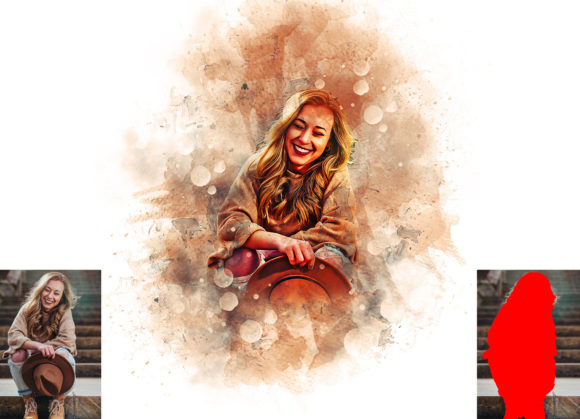
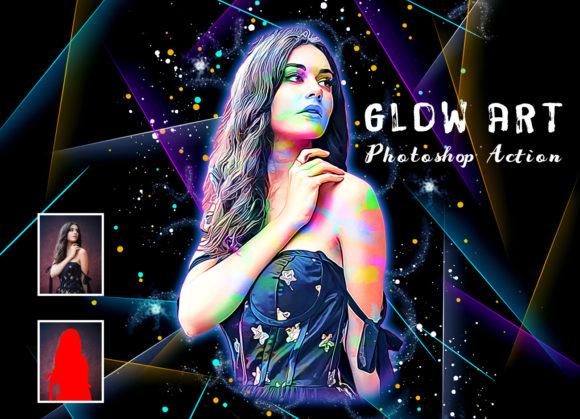
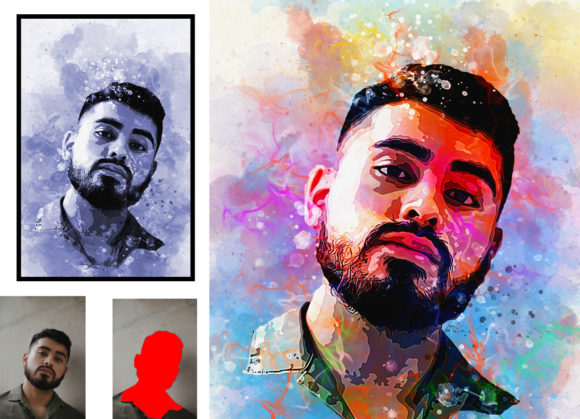
At its core, a Photoshop action is a sequence of commands that can be played back on a single file or a batch of files. A Watercolor Effect Photoshop Action specifically targets the aesthetic qualities of watercolor media, such as soft edges, color bleeding, and paper texture integration. Unlike manual techniques that require significant skill in digital painting, this automated approach allows users to achieve a consistent look with minimal effort. The primary value proposition lies in its non-destructive nature, meaning the original image data remains intact, allowing for further adjustments or complete reversibility if the result does not meet expectations.
These actions are typically compatible with a wide range of Adobe Photoshop versions, including CS4, CS5, CS5.5, CS6, and the Creative Cloud series from CC2014 through CC2020. This broad compatibility ensures that users with older software installations can still utilize the tool effectively, provided they are running the English version of the software. The reliance on specific language versions is common in action development due to how Photoshop records menu commands and layer names internally.
Key Features and Customization Options
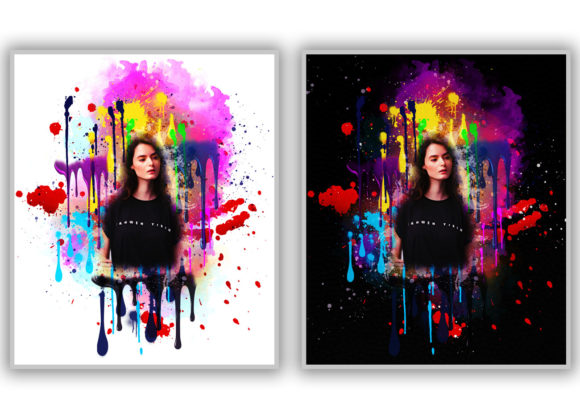
One of the most compelling aspects of a high-quality Watercolor Effect Photoshop Action is the level of customization it offers despite being an automated process. Users are not locked into a single, rigid output. Instead, many advanced actions provide multiple variations to suit different artistic visions. For instance, some packages include up to 20 different color options, which can be accessed by toggling the visibility of specific layers, often labeled as "unviewed eye" layers in the Layers panel. This feature allows for rapid experimentation with color palettes without needing to restart the action or manually adjust hue and saturation sliders from scratch.
Furthermore, the ability to change brush colors easily adds another layer of control. Since the effect relies heavily on brush strokes to simulate paint application, having the flexibility to alter these elements ensures that the final image aligns with the user’s creative intent. The inclusion of custom brushes and patterns in the download package is standard practice, as these assets are crucial for achieving authentic textures that default Photoshop brushes may not provide.
Workflow and Technical Requirements
To achieve optimal results, users must adhere to a specific workflow. Precision in following instructions is critical because actions rely on exact layer names and structures. A typical procedure involves opening the source photo, creating a new layer, and renaming it to “brush” in lowercase letters. The user then selects a soft brush to paint over areas of the image where the watercolor effect should be most prominent. This step acts as a mask or guide for the action, telling the software where to apply the heavy artistic processing. After closing the visibility of the brush layer, the user selects the background layer and plays the action.
Technical specifications also play a vital role in the outcome. It is recommended to use images with a resolution of approximately 2000x3000 pixels. Lower resolutions may result in pixelation or loss of detail when the action applies texture overlays, while excessively high resolutions might slow down processing time without adding significant visual benefit. The package usually includes an ATN file (the action itself), custom brushes, patterns, a PDF read-me file, and a help file. These resources are designed to support a non-destructive workflow, ensuring that users can tweak individual layers after the action has finished playing.
Evaluating the Benefits and Tradeoffs
When considering whether to integrate a Watercolor Effect Photoshop Action into your workflow, it is important to weigh the benefits against potential limitations. The primary advantage is efficiency. What might take several hours to paint manually can be achieved in minutes. This makes the tool ideal for professionals who need to produce high volumes of artistic content quickly, such as social media managers, print-on-demand designers, or photographers looking to offer varied styles to clients.
However, there are tradeoffs. Automated actions, no matter how sophisticated, lack the nuanced decision-making of a human artist. They may struggle with complex compositions, such as images with busy backgrounds or intricate facial features, where precise control over paint flow is necessary. In such cases, the result might appear generic or overly processed. Additionally, while the action is non-destructive, achieving a truly unique look often requires post-action manual adjustments, such as refining layer masks or adjusting opacity levels. Users should expect to spend some time fine-tuning the output rather than relying solely on the one-click solution.
Ideal Use Cases and Alternatives
This tool is a strong fit for scenarios where consistency and speed are prioritized over absolute artistic uniqueness. It is particularly useful for creating mockups, designing greeting cards, or producing stylized portraits for web content. If your goal is to transform a large batch of similar photos into a cohesive artistic series, a Watercolor Effect Photoshop Action provides the uniformity needed for a professional presentation.
Conversely, alternatives may be worth considering for projects requiring high-end, bespoke artistry. Manual digital painting using a tablet and custom brushes offers unparalleled control and allows for true creative expression. Additionally, other software solutions dedicated to artistic filters or AI-driven art generators might provide different stylistic outcomes that better suit specific project needs. For users unfamiliar with Photoshop’s layer management, the learning curve associated with setting up the action correctly might also make simpler, standalone apps a more viable option.
Making an Informed Decision
Ultimately, the decision to use a Watercolor Effect Photoshop Action depends on your specific goals, technical proficiency, and project requirements. If you are comfortable with basic Photoshop operations, such as creating layers and adjusting visibility, and you need a reliable method to add artistic flair to your images, this tool offers significant value. It bridges the gap between photographic realism and painterly abstraction, providing a practical solution for enhancing visual content. By understanding the setup process, respecting the recommended image dimensions, and leveraging the customization options, users can maximize the potential of this digital asset. Always review the included help files and test the action on sample images to ensure it aligns with your desired aesthetic before committing to larger projects.