Wave Stamp Set for Procreate Palette
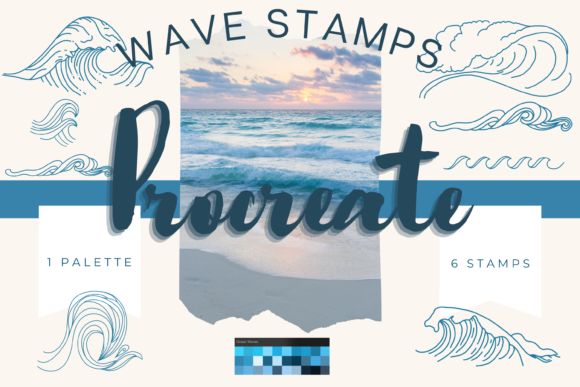
Digital illustration has evolved from a niche hobby into a versatile tool for creators across industries. Whether you are designing custom wedding invitations, creating assets for print-on-demand stores, or simply journaling your daily thoughts, the right tools can significantly impact your workflow and final output. The Wave Stamp Set for Procreate Palette represents a specific intersection of convenience and artistic control, offering a collection of hand-drawn digital brushes designed to streamline the creation of oceanic and fluid-themed artwork.
This instant download package is not merely a set of static images; it is a functional toolkit within the Procreate ecosystem. It includes eight unique individual digital brushes that allow users to stamp wave motifs directly onto their canvas. For many, the appeal lies in the balance between pre-made efficiency and creative flexibility. These elements are fully resizable and recolorable, meaning they can adapt to various project scales, from small social media graphics to large-format wall art.
Understanding the Toolset
At its core, this brush pack is designed for the Procreate app on iPad. It requires an Apple Pencil and an iPad Pro or compatible iPad model to function effectively. The files are digital brushes, meaning they do not work in Photoshop, Illustrator, or other desktop-based software without conversion. This specificity is crucial for potential users to understand before purchasing.
The set also includes an Ocean color palette swatch. This addition is particularly valuable for maintaining color harmony in your designs. Instead of spending time selecting individual hex codes that complement each other, users can instantly access a curated range of blues, teals, and aquas that mimic natural water tones. This feature supports both speed and aesthetic consistency, which is vital for professional-looking results.
Perspectives for Different Creators
The value of the Wave Stamp Set for Procreate Palette varies depending on your experience level and professional goals. Here is how different audiences might evaluate and utilize this tool.
For Beginners and Hobbyists
If you are new to digital art, the learning curve of drawing complex textures like water can be steep. Waves require an understanding of light, refraction, and fluid dynamics. For beginners, this stamp set serves as an educational scaffold. By using the stamps as a guide, you can trace over them on additional layers to practice your brush strokes. A practical tip is to reduce the opacity of the stamp layer and use it as an underlay. This method allows you to focus on line quality and shading without worrying about the underlying structure.
Hobbyists who enjoy digital scrapbooking or greeting card making will appreciate the immediacy of the tool. You do not need to spend hours perfecting a wave illustration when a high-quality, hand-drawn element is available instantly. This allows you to focus on composition and message rather than technical execution.
For Professional Designers and Entrepreneurs
Freelancers and small business owners often operate under tight deadlines. For these professionals, time is a direct cost. The ability to drag, drop, resize, and recolor a wave element can save hours of manual illustration time. This efficiency is particularly relevant for those involved in print-on-demand businesses, where volume and variety are key to success.
However, professionals must consider licensing and uniqueness. While these brushes are efficient, they are available to other users. To maintain a unique brand identity, experienced designers should use these stamps as base elements rather than final products. Combining the stamps with textures, clipping masks, and custom brushwork ensures that the final design remains distinct. For example, a designer might use a wave stamp as a clipping mask for a photographic texture, creating a hybrid look that is neither purely digital nor purely photographic.
For Educators and Content Creators
Educators teaching digital art can use this set to demonstrate layer management and blending modes. By showing students how to interact with pre-made assets, instructors can highlight important concepts such as non-destructive editing. Students can experiment with opacity, blending modes, and color adjustments without the pressure of creating perfect anatomy or perspective from scratch.
Bloggers and social media influencers may find these brushes useful for creating cohesive visual themes. If your content focuses on travel, mindfulness, or coastal living, having a consistent set of wave elements can strengthen your brand identity. The included ocean palette ensures that your graphics remain visually harmonious across different posts and platforms.
Practical Applications and Techniques
The versatility of the Wave Stamp Set for Procreate Palette extends beyond simple illustration. Here are several practical ways to integrate these brushes into your workflow:
- Greeting Cards and Invitations: Use the stamps to create borders or background elements for wedding invitations, baby showers, or birthday cards. The hand-drawn aesthetic adds a personal touch that rigid vector graphics often lack.
- Wall Art and Prints: Combine multiple wave stamps to create larger, continuous patterns. By varying the size and opacity, you can create depth and movement, suitable for nursery decor or beach house art.
- Wrapping Paper and Textiles: Create seamless patterns by repeating the wave elements. This is ideal for custom wrapping paper designs or fabric prints for home goods.
- Digital Journaling: Add subtle decorative elements to your digital planner pages. The stamps can serve as dividers, headers, or decorative accents that enhance readability without overwhelming the text.
To maximize the potential of these brushes, consider using them in conjunction with textures. Importing paper or canvas textures and using clipping masks can give your digital waves a traditional media feel. This technique bridges the gap between digital convenience and analog warmth, appealing to audiences who appreciate the look of watercolor or ink but prefer the flexibility of digital tools.
Technical Considerations and Workflow
Before integrating this tool into your projects, ensure your hardware and software are compatible. As noted, these files are exclusive to the Procreate app on iPad. You will need a platform to download the files, such as iCloud, Dropbox, or Google Drive, and then import them into Procreate. The installation process is straightforward but requires familiarity with file management on iOS.
Resizing is a critical function. You can adjust the size of the stamps using the brush resize tool within Procreate or by using the move and resize tool after stamping. This flexibility allows you to use the same brush for fine details or broad background sweeps. Recoloring is equally simple, leveraging Procreate’s robust color adjustment features to match your specific project needs.
It is important to remember that while these tools simplify the creation process, they do not replace fundamental design principles. Composition, color theory, and balance remain essential. The stamps are components, not complete solutions. Their effectiveness depends on how thoughtfully they are integrated into your broader design strategy.
Evaluating Fit for Your Needs
When deciding whether the Wave Stamp Set for Procreate Palette is right for you, consider your primary goals. If you prioritize speed and ease of use for commercial projects, this set offers significant value. If you are a beginner looking to learn watercolor techniques, it provides a safe environment for experimentation. However, if you seek completely unique, one-of-a-kind illustrations that no one else can replicate, you may need to invest more time in manual creation or heavily modify these base elements.
Ultimately, digital tools are meant to enhance creativity, not replace it. This brush pack serves as a catalyst, allowing you to bypass technical hurdles and focus on storytelling and design. Whether you are creating a single greeting card or launching a full product line, understanding how to leverage these assets can elevate your work and streamline your process.